Showing posts with label video games. Show all posts
Showing posts with label video games. Show all posts
Saturday, January 31, 2009


Wednesday, September 10, 2008
NHL 09 - Proud Owner for the past 6 hours...
Well I whipped over to the mall after work and plunked down the $60. So far, so good!
I've only played the much hyped "Be a Pro" mode so far...I'm hooked! Took me a good while to create my guy, I went through every option and every piece of gear. Good stuff. Nothing like seeing myself suit up for my first game on the Marlies! I'm not usually one for Create a Player modes, but this year is the exception, cause this mode is very revolutionary and it's not like you just make yourself and pop onto the NHL team. You start out in the minors and work your way up, kinda like real life!
I've played just 5 games so far, 5 minute periods, on "All Star" (2nd highest) difficulty..."Pro" is probably too comfortable, but "Superstar" (highest) would have the CPU pulling all kinds of cheat moves I bet. I want it difficult, but not impossible. :)
"Be a Pro" mode features a couple different ways to play. I'm playing the mode where you actually have to sit on the bench in between shifts, hoping your teammates can get it done! :) Using default settings so far, dunno what I would change yet. I've seen a few penalties, haven't taken one yet, but I assume I'll have to sit in sin bin for 2 minutes or less at some point!
It's fun to get used to calling line changes when you're on the bench...I totally blew it in my last game, left my goalie high and dry and Bridgeport scored a tying goal two-on-none in the last minute. :(
I've only scored a couple goals (really have to work for them!): one I was left all alone in front of their net after a turnover, and the other was more of an own-goal that one of their guys put home for me. :P LOTS of different ways to score in this game! Mostly I whip it wide of the net, if I make contact at all, but I'm getting the hang of it.
Most importantly, no show-stopping bugs so far. 4 hours of gaming and no freezes. I'm hoping Dynasty mode is as robust as this seems to be, but I don't wanna jinx it!
The menus are so much better than NHL 08...nice and smooth, not the jerkiness of last year. The goalie animations are much improved, I love them. The atmosphere of the arenas are also well done.
The only wacky thing I saw so far was Marlies goalie Justin Pogge making a save and then the puck shot out of our zone at superspeed...watch it here if you like. I'm going to make good use of the new replay editor, long overdue feature! Finally I can show off the wacky stuff without digging out my digital camera. You can also take screenshots, nice.
As far as negatives, the file system is kinda odd when you go to save something...it pulls up a keyboard interface so you can name your file, but you can't seem to give your files a useful name. They get named "Beapro1", "Beapro2" and "Video1", Video2" etc. It is possible to erase the text, but then you can't type in any letters, only numbers, so "01", "777", etc. Maybe I'm doing something wrong, but all the alpha keys were greyed out. I'd much rather label a replay as "turbopuck" than "video3". And "BAPWellwood", instead of "Beapro02", if I want to play Be a Pro with a current NHLer, alongside my created guy, etc. Oh well, I can write them down I guess...?
Anyway, extreme nitpicking aside, I truly love this game! Bravo EA, you have rescued the franchise in a Big Way! This could be the year that succeeds longtime champ NHL 2004 as my favourite, but I'll have to put several more hours into it before we go crowning anything around here. Fortunately, the weekend is approaching.
I didn't check out any online stuff. But even if that's all a complete train wreck, the offline alone could well be worth the purchase.
I can definitely tell the AHLers have less skill than the NHLers. Slower, less accuracy, etc. Awesome. Crosby is much better than some minor league rookie.
Anyway, that's a taste. Ahh, so nice to be able to talk hockey again, even if it is a video game. Judging by the Leafs roster this year, I'll probably be playing more than watching...
See you next time with more thoughts.
I've only played the much hyped "Be a Pro" mode so far...I'm hooked! Took me a good while to create my guy, I went through every option and every piece of gear. Good stuff. Nothing like seeing myself suit up for my first game on the Marlies! I'm not usually one for Create a Player modes, but this year is the exception, cause this mode is very revolutionary and it's not like you just make yourself and pop onto the NHL team. You start out in the minors and work your way up, kinda like real life!
I've played just 5 games so far, 5 minute periods, on "All Star" (2nd highest) difficulty..."Pro" is probably too comfortable, but "Superstar" (highest) would have the CPU pulling all kinds of cheat moves I bet. I want it difficult, but not impossible. :)
"Be a Pro" mode features a couple different ways to play. I'm playing the mode where you actually have to sit on the bench in between shifts, hoping your teammates can get it done! :) Using default settings so far, dunno what I would change yet. I've seen a few penalties, haven't taken one yet, but I assume I'll have to sit in sin bin for 2 minutes or less at some point!
It's fun to get used to calling line changes when you're on the bench...I totally blew it in my last game, left my goalie high and dry and Bridgeport scored a tying goal two-on-none in the last minute. :(
I've only scored a couple goals (really have to work for them!): one I was left all alone in front of their net after a turnover, and the other was more of an own-goal that one of their guys put home for me. :P LOTS of different ways to score in this game! Mostly I whip it wide of the net, if I make contact at all, but I'm getting the hang of it.
Most importantly, no show-stopping bugs so far. 4 hours of gaming and no freezes. I'm hoping Dynasty mode is as robust as this seems to be, but I don't wanna jinx it!
The menus are so much better than NHL 08...nice and smooth, not the jerkiness of last year. The goalie animations are much improved, I love them. The atmosphere of the arenas are also well done.
The only wacky thing I saw so far was Marlies goalie Justin Pogge making a save and then the puck shot out of our zone at superspeed...watch it here if you like. I'm going to make good use of the new replay editor, long overdue feature! Finally I can show off the wacky stuff without digging out my digital camera. You can also take screenshots, nice.
As far as negatives, the file system is kinda odd when you go to save something...it pulls up a keyboard interface so you can name your file, but you can't seem to give your files a useful name. They get named "Beapro1", "Beapro2" and "Video1", Video2" etc. It is possible to erase the text, but then you can't type in any letters, only numbers, so "01", "777", etc. Maybe I'm doing something wrong, but all the alpha keys were greyed out. I'd much rather label a replay as "turbopuck" than "video3". And "BAPWellwood", instead of "Beapro02", if I want to play Be a Pro with a current NHLer, alongside my created guy, etc. Oh well, I can write them down I guess...?
Anyway, extreme nitpicking aside, I truly love this game! Bravo EA, you have rescued the franchise in a Big Way! This could be the year that succeeds longtime champ NHL 2004 as my favourite, but I'll have to put several more hours into it before we go crowning anything around here. Fortunately, the weekend is approaching.
I didn't check out any online stuff. But even if that's all a complete train wreck, the offline alone could well be worth the purchase.
I can definitely tell the AHLers have less skill than the NHLers. Slower, less accuracy, etc. Awesome. Crosby is much better than some minor league rookie.
Anyway, that's a taste. Ahh, so nice to be able to talk hockey again, even if it is a video game. Judging by the Leafs roster this year, I'll probably be playing more than watching...
See you next time with more thoughts.
Saturday, August 09, 2008
How To PS3 Hard Drive Upgrade, My Epic Journey from 80 to 320
Ok, so there’re plenty of PS3 Hard Drive Upgrade how to guides on the tubes. Just Google it, or check out CNET's coverage, that's a pretty definitive guide, and great photos. However, I’m going to let you in on a little secret that I couldn’t find ANYWHERE ON THE NET...keep reading! As there is a lot of incorrect information out there, I will try and debunk some myths and share some helpful facts as we go.
A few weeks ago, I decided it was high time to upgrade my “user-serviceable” PS3 hard drive. With the average game demo weighing in at 1.5GB, an annual subscription to Qore, arrival of the PSN Video Store (assuming it comes to Canada) and more and more games supporting Custom Soundtracks, I’m gonna want more room on this baby.
Fact 1: Upgrading the PS3 Hard Drive DOES NOT void the warranty.
So, I ordered up this giant 2.5“ drive from NCIX. Took a couple weeks to get it in stock, but it finally arrived Wednesday.
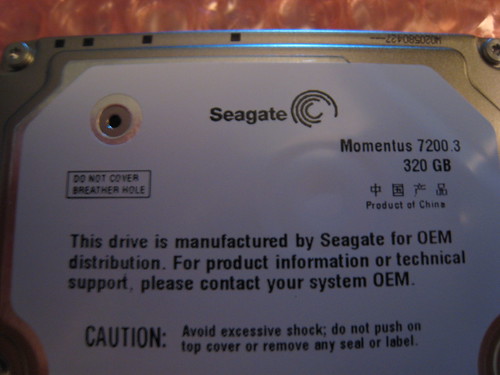
Fact 2: Not just any 2.5” drive will work...it has to be 9.5mm tall, and not 12mm, as some models are. However, speed and cache can be whatever you like. You can even throw a solid state flash drive in there, if your name is Richie Rich.
There is plenty of debate about 5400rpm vs 7200rpm. I went with 7200rpm...if there is a speed upgrade to be had, even small, I want in. And the heat doesn’t worry me...I believe at worst it’s a few degrees hotter. The one I got also has 16MB of cache, which should help I guess, I’m not an expert, but I play one on my blog. But to each his own, buy what you can afford, then you’ll be happy with it. I’m sure someone will throw a 10k rpm drive in there soon enough...
But, before you can install the new drive, what about the precious data on your current drive? Well, there’re a couple options:
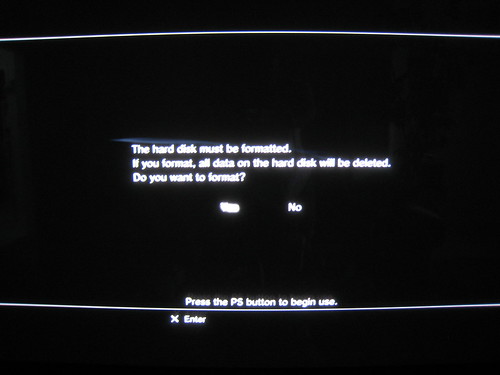
1) Forget about your data, install the new drive, and simply start over in MGS4, GTA, Pixel Junk Monsters and Uncharted! You can at least re-download your PSN content for free. I didn’t say it was a good option!
2) Copy each game save one at a time to a flash memory card (if your PS3 has the card reader slots, or if you have a USB card reader, etc). HOWEVER, some games have COPY-PROTECTED saves...no, I’m not kidding! Rock Band, for example, does not let you copy the save...they’re worried about you unlocking songs for your friends I guess? So, this option is out. I want ALL my data, please!
3) Sony has conveniently included a “Backup Utility” in the PS3 menus. This option allows you to Backup your PS3 hard drive onto external storage (USB drive, etc). I recommend you use it often, depending on how much gaming and content you chew through.
So you’re maybe asking, what good is a Backup without a Restore function? No good, Zero Good, in fact. A backup is not a backup if the restore process doesn’t work...that's Page One of the Little Golden Book of I.T.! Page Two says if it's not backed up twice, it's not backed up!
So, the PS3 Backup Utility includes a Restore function. Or, does it? Well, yeah it does, DEPENDING on what USB drive you’re restoring from!
Yes, that’s right dear reader, based on my first-hand experience, the PS3 appears to be somewhat finicky when it comes to Restoring Backups. Oh, it’s all well and good during the Backup process, but it’s only during the Restore process that you find out if You’re in Business or not.
Anyway, after the hour or longer process of backing up the PS3 hard drive, I popped the current drive out (more on this later!), and popped the new one in.
Start the Restore function. It allows me to browse to my external USB drive, and select the backup folder I want to Restore. Then, it waits for a couple minutes, apparently counting the size of the backup data. Then...it stops cold. There is no backup data found, it says!
I was horrified. However, I still had my current drive, so I hadn’t lost anything. Time to hit Google up for some easy answers. After searching about 40% of the Entire Internet, I found maybe 1 or 2 people having the same problem...to Sony’s credit, I’d say 99% of people are having no issues with this feature of the PS3. That’s good for them.
To those other 1%, I offer this information (this is the secret I hinted to): TRY RESTORING FROM A DIFFERENT USB DRIVE.
As luck would have it, I was able to borrow 4 USB drives from my work. Over a few hours, I copied my PS3 Data from the backup drive that doesn’t work, to the 4 borrowed ones. Then I randomly picked one, and tried the Restore option once again...
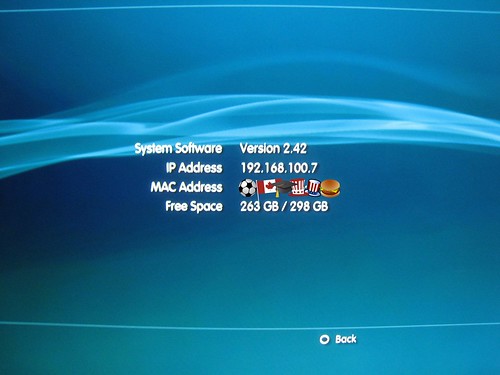
SUCCESS! 90 minutes later, my new 320GB drive is happily storing my previous drive’s hard-earned content, and has hundreds of fresh GBs to spare.
Fact 3: ALL my data was restored. This includes demos, PSN purchased games, saves (including COPY-PROTECTED saves), videos, music, pictures (with folder thumbnails), and even my PS2 saves. Outstanding! This is exactly what I was hoping for, and precisely what I would have expected from a Utility called “Backup Utility”...
Fact 4: The USB drive that DID NOT work is this one: MacAlly G-S350SUA - This is a fine enclosure otherwise though, I use it to backup my Mac regularly.
Fact 5: The USB drive I borrowed that DOES work is this one: IOGEAR Tri-Select Ion Drive
I don’t know why one works and the other doesn’t, even though they both work for the backup part of the backup process. I’d hazard a guess of something to do with the various USB controller card chipsets in the enclosures, but that’s as far as my knowledge of such things goes. Anyway, as long as you can find one that works, you’re golden! I was interested in testing the other 3 enclosures, but would have had to restore over my fresh drive, or my old one (if I put it back in)...no interest in wasting that kind of time, sorry. I’m all set, so that’s as far as I’m going with it.
Other stuff worth mentioning:
Fact 6: With the blank 320GB drive installed, my PS3 System Information page shows 263GB of 298GB free. So, just be aware, due to whatever FAT (file allocation table, or method of drive formatting) the PS3 uses, you’re left with less drive space than you thought you were getting, much less in this case! All computers do this, so don’t freak out about it.
Fact 7: I don’t have any Trophies, so I can’t tell you first hand if they are backed up and restored. However, Sony themselves have the goods on this one. When you earn trophies, sign in to the PSN and check your "Trophy Collection". This will “sync” your trophies to your profile online, and then when you install a new HD, you can simply fire up a trophy-supporting game, and the PSN will then sync them back down to you. w00ty.
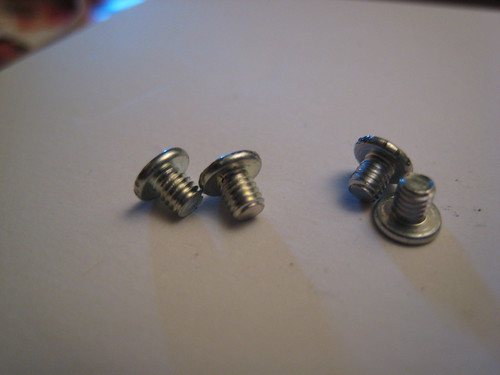
Fact 8: The screws used to hold the stock PS3 hard drive in its metal cage thingy, are horrifyingly impossible to remove. I stripped 3 out of 4, not a good percentage. Most of the forums I researched said the same things...wtf, soft screws, can’t get drive out, stripped screws, can I drill the hard drive free, etc. Anyway, use a good set of pliers by gripping the edge of the screws, and hopefully you can get them out. Some people have got replacement screws from Sony, FWIW, YMMV. If you have the exact right size screwdriver in the first place, perhaps you'll have no problem.
Ok so that's all I know of it. Good luck, and may all your enclosures be PS3 Restore-function compatible. Click here to see the entire photoset on Flickr, since I just learned how to do that.
A few weeks ago, I decided it was high time to upgrade my “user-serviceable” PS3 hard drive. With the average game demo weighing in at 1.5GB, an annual subscription to Qore, arrival of the PSN Video Store (assuming it comes to Canada) and more and more games supporting Custom Soundtracks, I’m gonna want more room on this baby.
Fact 1: Upgrading the PS3 Hard Drive DOES NOT void the warranty.
So, I ordered up this giant 2.5“ drive from NCIX. Took a couple weeks to get it in stock, but it finally arrived Wednesday.
Fact 2: Not just any 2.5” drive will work...it has to be 9.5mm tall, and not 12mm, as some models are. However, speed and cache can be whatever you like. You can even throw a solid state flash drive in there, if your name is Richie Rich.
There is plenty of debate about 5400rpm vs 7200rpm. I went with 7200rpm...if there is a speed upgrade to be had, even small, I want in. And the heat doesn’t worry me...I believe at worst it’s a few degrees hotter. The one I got also has 16MB of cache, which should help I guess, I’m not an expert, but I play one on my blog. But to each his own, buy what you can afford, then you’ll be happy with it. I’m sure someone will throw a 10k rpm drive in there soon enough...
But, before you can install the new drive, what about the precious data on your current drive? Well, there’re a couple options:
1) Forget about your data, install the new drive, and simply start over in MGS4, GTA, Pixel Junk Monsters and Uncharted! You can at least re-download your PSN content for free. I didn’t say it was a good option!
2) Copy each game save one at a time to a flash memory card (if your PS3 has the card reader slots, or if you have a USB card reader, etc). HOWEVER, some games have COPY-PROTECTED saves...no, I’m not kidding! Rock Band, for example, does not let you copy the save...they’re worried about you unlocking songs for your friends I guess? So, this option is out. I want ALL my data, please!
3) Sony has conveniently included a “Backup Utility” in the PS3 menus. This option allows you to Backup your PS3 hard drive onto external storage (USB drive, etc). I recommend you use it often, depending on how much gaming and content you chew through.
So you’re maybe asking, what good is a Backup without a Restore function? No good, Zero Good, in fact. A backup is not a backup if the restore process doesn’t work...that's Page One of the Little Golden Book of I.T.! Page Two says if it's not backed up twice, it's not backed up!
So, the PS3 Backup Utility includes a Restore function. Or, does it? Well, yeah it does, DEPENDING on what USB drive you’re restoring from!
Yes, that’s right dear reader, based on my first-hand experience, the PS3 appears to be somewhat finicky when it comes to Restoring Backups. Oh, it’s all well and good during the Backup process, but it’s only during the Restore process that you find out if You’re in Business or not.
Anyway, after the hour or longer process of backing up the PS3 hard drive, I popped the current drive out (more on this later!), and popped the new one in.
Start the Restore function. It allows me to browse to my external USB drive, and select the backup folder I want to Restore. Then, it waits for a couple minutes, apparently counting the size of the backup data. Then...it stops cold. There is no backup data found, it says!
I was horrified. However, I still had my current drive, so I hadn’t lost anything. Time to hit Google up for some easy answers. After searching about 40% of the Entire Internet, I found maybe 1 or 2 people having the same problem...to Sony’s credit, I’d say 99% of people are having no issues with this feature of the PS3. That’s good for them.
To those other 1%, I offer this information (this is the secret I hinted to): TRY RESTORING FROM A DIFFERENT USB DRIVE.
As luck would have it, I was able to borrow 4 USB drives from my work. Over a few hours, I copied my PS3 Data from the backup drive that doesn’t work, to the 4 borrowed ones. Then I randomly picked one, and tried the Restore option once again...
SUCCESS! 90 minutes later, my new 320GB drive is happily storing my previous drive’s hard-earned content, and has hundreds of fresh GBs to spare.
Fact 3: ALL my data was restored. This includes demos, PSN purchased games, saves (including COPY-PROTECTED saves), videos, music, pictures (with folder thumbnails), and even my PS2 saves. Outstanding! This is exactly what I was hoping for, and precisely what I would have expected from a Utility called “Backup Utility”...
Fact 4: The USB drive that DID NOT work is this one: MacAlly G-S350SUA - This is a fine enclosure otherwise though, I use it to backup my Mac regularly.
Fact 5: The USB drive I borrowed that DOES work is this one: IOGEAR Tri-Select Ion Drive
I don’t know why one works and the other doesn’t, even though they both work for the backup part of the backup process. I’d hazard a guess of something to do with the various USB controller card chipsets in the enclosures, but that’s as far as my knowledge of such things goes. Anyway, as long as you can find one that works, you’re golden! I was interested in testing the other 3 enclosures, but would have had to restore over my fresh drive, or my old one (if I put it back in)...no interest in wasting that kind of time, sorry. I’m all set, so that’s as far as I’m going with it.
Other stuff worth mentioning:
Fact 6: With the blank 320GB drive installed, my PS3 System Information page shows 263GB of 298GB free. So, just be aware, due to whatever FAT (file allocation table, or method of drive formatting) the PS3 uses, you’re left with less drive space than you thought you were getting, much less in this case! All computers do this, so don’t freak out about it.
Fact 7: I don’t have any Trophies, so I can’t tell you first hand if they are backed up and restored. However, Sony themselves have the goods on this one. When you earn trophies, sign in to the PSN and check your "Trophy Collection". This will “sync” your trophies to your profile online, and then when you install a new HD, you can simply fire up a trophy-supporting game, and the PSN will then sync them back down to you. w00ty.
Fact 8: The screws used to hold the stock PS3 hard drive in its metal cage thingy, are horrifyingly impossible to remove. I stripped 3 out of 4, not a good percentage. Most of the forums I researched said the same things...wtf, soft screws, can’t get drive out, stripped screws, can I drill the hard drive free, etc. Anyway, use a good set of pliers by gripping the edge of the screws, and hopefully you can get them out. Some people have got replacement screws from Sony, FWIW, YMMV. If you have the exact right size screwdriver in the first place, perhaps you'll have no problem.
Ok so that's all I know of it. Good luck, and may all your enclosures be PS3 Restore-function compatible. Click here to see the entire photoset on Flickr, since I just learned how to do that.
Subscribe to:
Posts (Atom)